Pages

Search This Blog

Showing posts with label ANDROID. Show all posts

Friday, April 22, 2016

How to download and setup android development environment

By Agent Smith for Codingsec.net

In this article I am going to demonstrate you how to setup android studio development environment, If you want to learn something or do something or watch a movie you gotta setup the environment first.
Hence Today I am going to demonstrate you that.
Android Studio is an official IDE for developing android applications. For running Android Studio you must have minimum 2 GB RAM but 4 GB RAM is recommended. As I already told you in previous tutorial that android apps are developed in Java language so JDK is also required. Below I have explained each and every step with screenshots wherever required.
Note: The procedure that I have explained below is for Windows OS, so it will be little bit different for other operating systems.

Installing Java JDK

Thursday, July 23, 2015

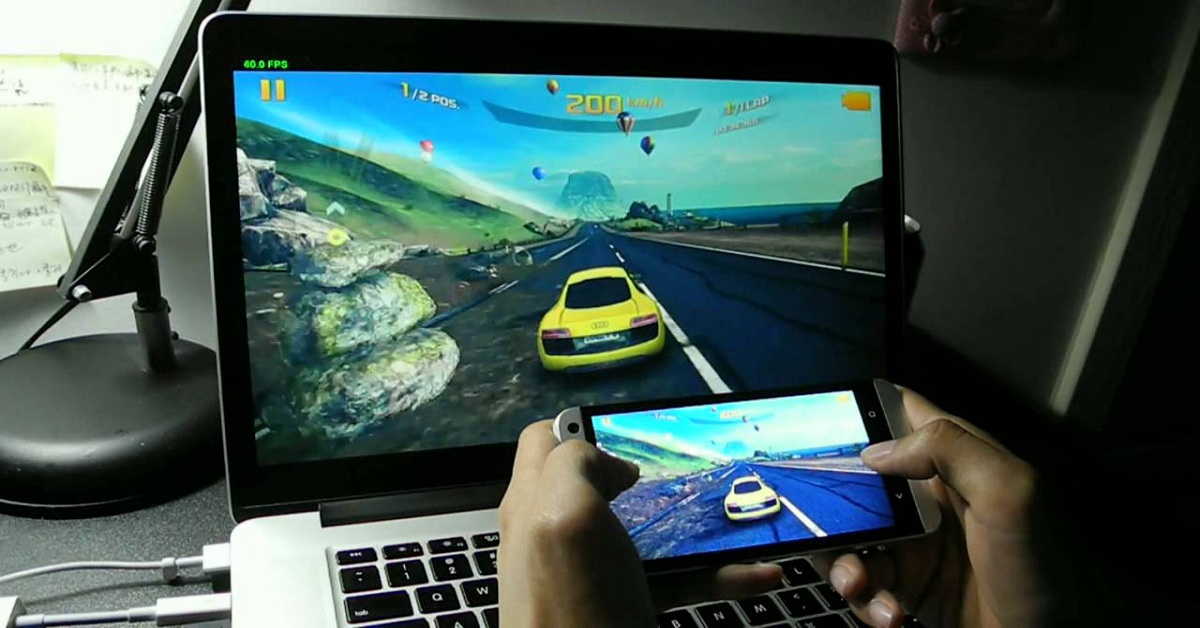
How to mirror your Android mobile screen to PC screen


These days, we can almost connect any two devices wirelessly on the same network. Mirroring your Android device can be very useful in many ways. You could play the games on your mobile and see them on a big screen. It works just like a wireless projector.

Wednesday, June 3, 2015

Android Software development in Nigeria


Top Nigerian Android Apps you will Love


Android is the Leading Mobile Operating system in Nigeria but Sadly , Nigerian Apps are not popular. If I should conduct a survey , I wouldn’t be surprised to know that 70% of Nigerians don’t use local apps.
Inspite of this , there are still some awesome Nigerian Apps that deserve your attention. I have combed the web for local apps and I bring to you , Top Nigerian apps you should download.

Saturday, May 16, 2015

How to Change Profile Picture on WhatsApp without Cropping

As a very Tall Guy , I find it annoying that each time I want to change profile picture on WhatsApp , I will have to crop out my Nice shoes just so that my picture fits into WhatsApp. I became fed up and decided to find a solution to this. Luckily for me , I meet Whatscrop.

Monday, March 16, 2015

#Tech-News: BlackBerry announces its new high security tablet SecuTABLET


In an event on Saturday Blackberry revealed its new highly secured SecuTablet, a tablet which it says is suitable for privacy lovers, businesses and government offices.
SecuTablet is based on Samsung Galaxy S 10.5 and has been developed by BlackBerry in partnership with  IBM and Samsung.
The SecuTablet is also a result of BlackBerry’s purchase of security firm, Secusmart last year and is BlackBerry’s attempt to woo buyers who are more inclined towards privacy and security.

Saturday, March 14, 2015

10 Amazing Facts You Didnt Know About Android

Android, the worlds mostly widely used smartphone operating System is growing day by day with its highly enriched user interface and extensively used mobile applications.  Some are using it as platform to develop applications while the others use it as one of source which connects them with their friends and relatives due to its highly customizable and user friendly applications.

Friday, March 6, 2015

#TechNews: Eight(8) facts you need to know about the INEC CARD READER


   1. Built with Android OS: The Card Reader uses a highly secure cryptographic technology that is used commonly in devices that need to perform secure transactions, such as paying terminals. It has ultra-low power consumption, with a single core frequency of 1.2GHz and an Android 4.2.2. Operating System. The INEC staff operating the Card Reader will scan the PVC of each voter to verify its genuiness before allowing the voter to get accredited. It takes an average of 10 to 20 seconds to authenticate a voter.

Thursday, November 13, 2014

Oh great, humans taught a robot how to do karate


  • By James Plafke

ATLAS crane kick

The Institute for Human Learning and Machine Cognition (IHMC) — which sounds like a facility where robots reprogram rebel humans to become sympathetic with the machine plight — taught its humanoid robot Atlas to mimic The Karate Kid’s famous crane kick. Standing 6-foot-2 and weighing a bulky 330 pounds for its height, the robot — named Ian —

Monday, October 20, 2014

Android 5.0 Lollipop: All the details and features of Google’s sweetest treat yet

By  

Lollipop Forest
Google revealed many details about the new version of Android a few months ago, but we didn’t get a name — it was simply “Android L.” Now there’s finally a name and a version number to go with it. Android 5.0 Lollipop is a seismic shift for Android in both design and features. With all the details of Android 5.0 now in the wild, it’s time to tell you all about the latest, largest, and greatest Android release yet. Buckle up and sit back: There’s a lot of

Wednesday, July 9, 2014


The best way to completely     wipe your Android device

The default data wipe tool in Android may not be enough to permanently eliminate personal data on your old device.


A study from security software vendor Avast has suggested that the factory reset option built into the Android operating system isn't effective in eradicating your personal data from old devices. The firm purchased 20 used Android smartphones on eBay and was able to recover more than 40,000 photos, 750 emails and text messages, and 250 contacts, along with the identities of four of the previous device owners, and even a completed loan application. To make matters worse, Avast employees were using readily available data recovery software to get the job done.
While Avast and other companies like it offer data deletion tools, there are other steps you can take to securing your personal data when performing a factory reset.

Step one: Encrypting

I recommend encrypting your device before you are getting ready to wipe it. The encryption process will scramble the data on your device and, even if the wipe doesn't fully delete the data, a special key will be required to unscramble it.
To encrypt your device, enter settings, click on Security, and select Encrypt phone.

Step two: Perform a factory reset

The next thing you will want to do is perform a factory reset. This can be done by selecting Factory data reset in the Backup & reset option in the settings menu. You should be aware that this will erase all of the data on your phone and that you should backup anything you don't want to lose.

Step three: Load dummy data

Following step one and two should be enough for most people, but there's an extra step you can take to add another layer of protection when erasing your personal data. Try loading fake photos and contacts on your device. Why you ask? We will address that in the next step.

Step four: Perform another factory reset

You should now perform another factory reset, thus erasing the dummy content you loaded onto the device. This will make it even harder for someone to locate your data because it will be buried below the dummy content.
Still feeling a little paranoid? Repeat steps three and four as many times as you like. As I mentioned above, though, for most people simply following steps one and two should be enough. Without the encryption pin, which is overwritten in the initial factory reset, it will be almost impossible to unscramble your data.
Then again, you could always take a hammer to your phone or toss it in the toilet. You know, if you aren't interested in selling it.